
Posts · Mcp
How We Implemented MCP in Qatarina
In this article we will walk through how our team implemented MCP in Qatarina, an Open Source Software Quality Assurance project, to enable teams to automate reporting and analysis of software testing process.
Anyone who has run a test cycle knows the testing is only half the work. The other half is the reporting: counting passes and failures per module, chasing unassigned test cases, and writing the status update for the release meeting. With MCP, a QA lead can now ask an AI assistant those questions directly, and the answers come from live Qatarina data.
Qatarina and MCP in brief
Qatarina is an open source test management platform being built by the Golang Malawi community, with our team from NNDI leading the efforts. Teams use it to organise projects into modules, write test cases, group them into test plans for a round of testing, assign them to testers, and record each result as a test run. It is a Go backend with a React web UI.
The Model Context Protocol (MCP) is an open standard for connecting AI assistants to external systems. A server exposes a set of tools, each with a name, a description and typed parameters. Any MCP-capable client, such as Claude Code, Claude Desktop, VS Code or Codex, can discover those tools and call them on the user’s behalf.
Put the two together and Qatarina becomes something an assistant can read from and act on, not just something a person clicks through.
Why MCP for quality assurance
The data for a good test report already lives in Qatarina; the effort goes into pulling it together. Before MCP, a typical status update meant:
- Opening each test plan to check its progress.
- Filtering test runs to find what failed, and reading the tester’s notes on each.
- Working out which test cases had never been run at all.
- Copying all of that into a message or document for the team.
We could have built more dashboards, but every team asks slightly different questions. MCP let us expose the building blocks once and let the assistant compose them. A question like “what is still failing in the payments module, and who tested it last?” becomes a handful of tool calls rather than a new feature request.
MCP also works in the other direction. The same assistant can create test cases from a specification, assign them to testers and record results, so the reporting loop and the testing loop share one interface.
How it fits together
The MCP server is not a separate service. It is a subcommand of the same qatarina binary, started with qatarina mcp, and it reads the same configuration file and database as qatarina server.
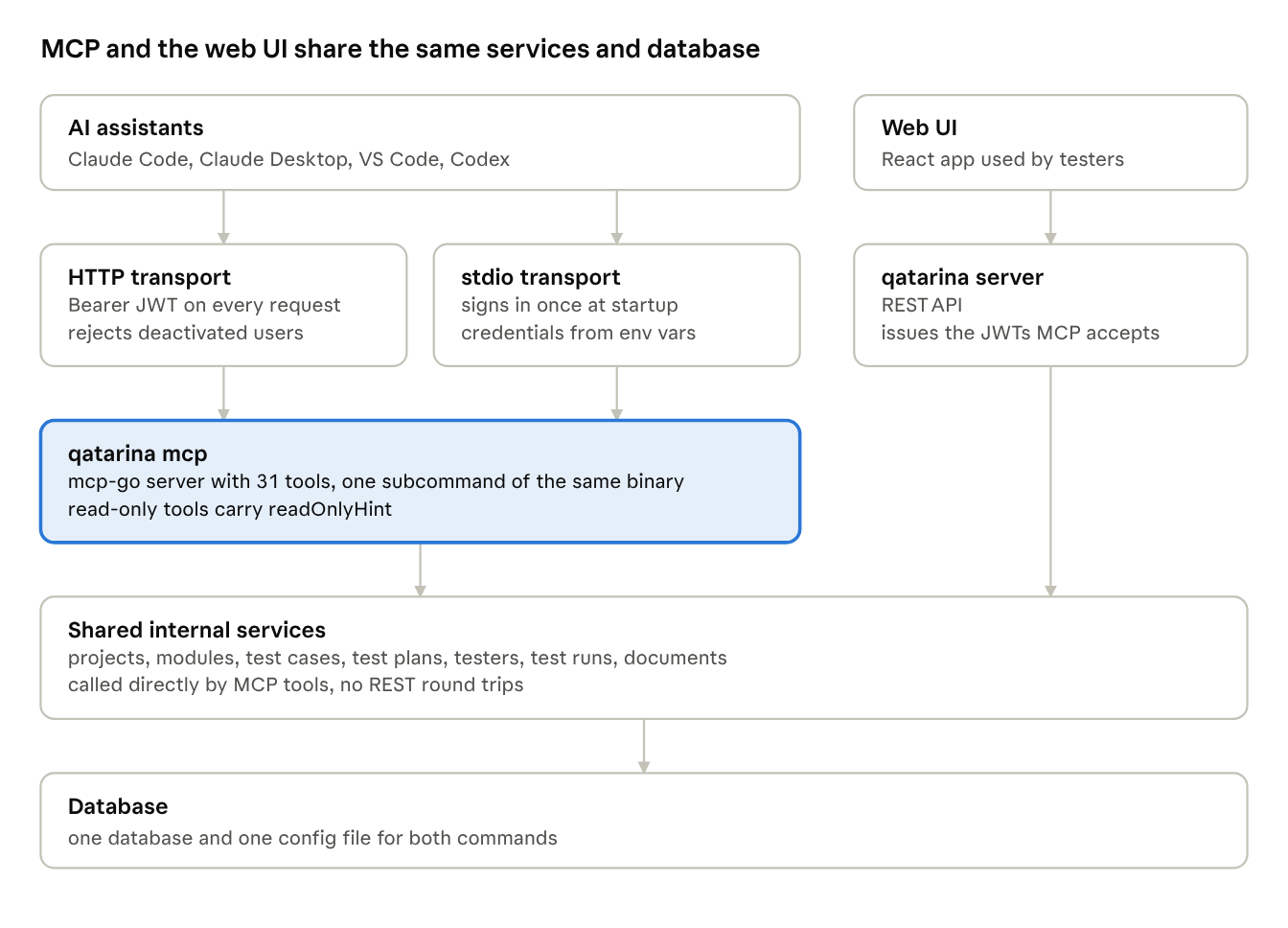
We built it on mcp-go. Its tools call Qatarina’s internal Go services directly instead of making HTTP calls to our own REST API. That keeps the business rules in one place and lets us shape each tool for an assistant rather than copy an endpoint.
Every tool call runs as a real Qatarina user, through one of two transports:
- HTTP suits a shared server. Each request carries the same JWT the REST API issues at login. A middleware checks the signature and also that the user is still active, since an account may be deactivated after its token was issued.
- stdio suits a local setup. The AI client starts
qatarina mcpas a child process, which signs in once withQATARINA_EMAILandQATARINA_PASSWORD. Logs go to stderr, because stdout carries the MCP messages.
The tools we exposed
Qatarina’s MCP server now ships 31 tools. Most are read-only and built for reporting; a smaller set lets the assistant change data on the user’s behalf.
| Area | Reporting and analysis (read-only) | Actions (write) |
|---|---|---|
| Projects | list_projects, search_projects, get_project (with a test-result summary), list_modules | |
| Documents | project_list_documents, project_search_documents | |
| People | whoami, list_users, list_project_testers | assign_test_cases |
| Environments | list_project_environments | create_project_environment |
| Test cases | list_project_test_cases, search_test_cases, get_test_case, list_untested_cases, list_failed_test_cases | add_test_case, add_test_cases, update_test_case |
| Test plans | list_project_test_plans, search_test_plans, get_test_plan | add_test_plan, update_test_plan, add_test_plan_comment |
| Test runs | list_test_runs, get_test_run, list_failed_test_runs | record_test_result, record_test_comment |
A few tools exist purely for analysis. list_untested_cases answers “what haven’t we covered yet?”. list_failed_test_cases returns cases whose most recent result is a failure, while list_failed_test_runs returns every failure ever recorded, including ones later fixed. The tool descriptions say exactly that, so the assistant picks the right one.
Read-only tools carry MCP’s readOnlyHint annotation, so clients can auto-approve them while still asking before any write. Here is how one is declared with mcp-go:
func listFailedTestRunsTool() mcp.Tool {
    opts := []mcp.ToolOption{
        mcp.WithDescription("List a project's failed test runs, most recent first, with what the tester " +
            "observed. Every failure is listed, including those of test cases that later passed; use " +
            "list_failed_test_cases for the test cases that are failing now."),
        projectIDParam(),
        mcp.WithNumber("test_plan_id", mcp.Description("Only list runs in this test plan.")),
    }
    opts = append(opts, pageParams()...)
    opts = append(opts,
        mcp.WithReadOnlyHintAnnotation(true),
        mcp.WithDestructiveHintAnnotation(false),
    )
    return mcp.NewTool("list_failed_test_runs", opts...)
}
Example workflows
With the server connected, reporting becomes a conversation. These are prompts a QA lead can type into Claude Code or Claude Desktop as-is.
End-of-cycle status report
Summarise the progress of the open test plans in the Mobile Banking project. For each plan, list pass and fail counts, the test cases that are still failing with the tester’s notes, and anything that hasn’t been tested yet. Format it as a short update for the release meeting.
Behind the scenes the assistant calls search_projects, list_project_test_plans, then get_test_plan, list_failed_test_cases and list_untested_cases for each plan, and writes the summary.
Failure analysis
Look at the failed test runs in the last test plan. Group the failures by module and tell me whether they share a likely root cause.
Here list_failed_test_runs provides what each tester actually observed, and list_modules provides the grouping. The assistant does the pattern-spotting a person would otherwise do in a spreadsheet.
Closing the coverage gap
Find the untested cases in the checkout module and assign them evenly to the testers on this project.
This chains list_untested_cases, list_project_testers and assign_test_cases. Because assign_test_cases is a write tool, the client asks for confirmation before it runs.
From specification to test cases
Read the payments specification in the project documents and draft test cases for the refunds feature.
The assistant finds the document with project_search_documents, drafts the cases and creates them in one call with add_test_cases.
What we learned
Design tools for the task, not the endpoint. We chose early not to mirror the REST API. The tools call Qatarina’s internal services directly, so each one can answer a question whole. get_project returns a results summary alongside the project, and list_untested_cases answers a coverage question in one call, which keeps conversations short.
Descriptions are the interface. The assistant chooses tools by reading their descriptions. So we spell out the difference between similar tools, which tool returns the IDs a parameter expects, and the rules for a write (“the plan must be open and the test case must not be a draft”).
Page everything. Large projects have thousands of test cases. List tools return pages of 10 to 20 items by default, capped at 100, so responses fit in the model’s context.
Keep identity simple, then improve it. Reusing Qatarina’s existing JWTs got us to a working server fast. The trade-off is that tokens expire and must be refreshed by hand, which is our next thing to fix.
Build in small pieces. The server arrived through a series of small pull requests: authentication first, then read tools for projects and test cases, then test plans, testers, environments, and finally the reporting tools for test runs. Each piece was useful on its own, and contributors could pick up a slice without learning the whole system.
Try it yourself
The quickest way in is the stdio transport, where your AI client starts the server itself. Build Qatarina, then register it with Claude Code:
go build
claude mcp add --scope user qatarina \
  --env QATARINA_EMAIL=you@example.com \
  --env QATARINA_PASSWORD=your-password \
  -- /path/to/qatarina/qatarina --config /path/to/qatarina/qatarina.yaml mcp --transport stdio
Then start claude and ask: “What can I do on Qatarina?” The full setup guide, including HTTP transport, Claude Desktop and Windows, is in docs/mcp/README.md.
We have more plans ahead for Qatarina and it’s MCP integration including:
- A sturdier authentication flow for the HTTP transport, so tokens don’t need manual refreshing.
- Documented production deployment for shared MCP servers.
- More analysis tools, such as trends across test plans over time.
Qatarina is open source and we welcome contributions. If you have a reporting question your team asks every week, open an issue on GitHub and it may become the next tool.